5. Guided fault finding & community fixes
Guided fault finding turns one stored fault into a test plan — the checks to run, in the order the factory tester ranks them. Next to it, community fixes show how other STEUER14 users fixed the same fault on their cars.
Open both from a fault: select it on a control unit's Fault Memory tab and press Guided fault finding or Community fixes (N) (see chapter 4). The page has two tabs, Test plan and Community fixes.
The test plan
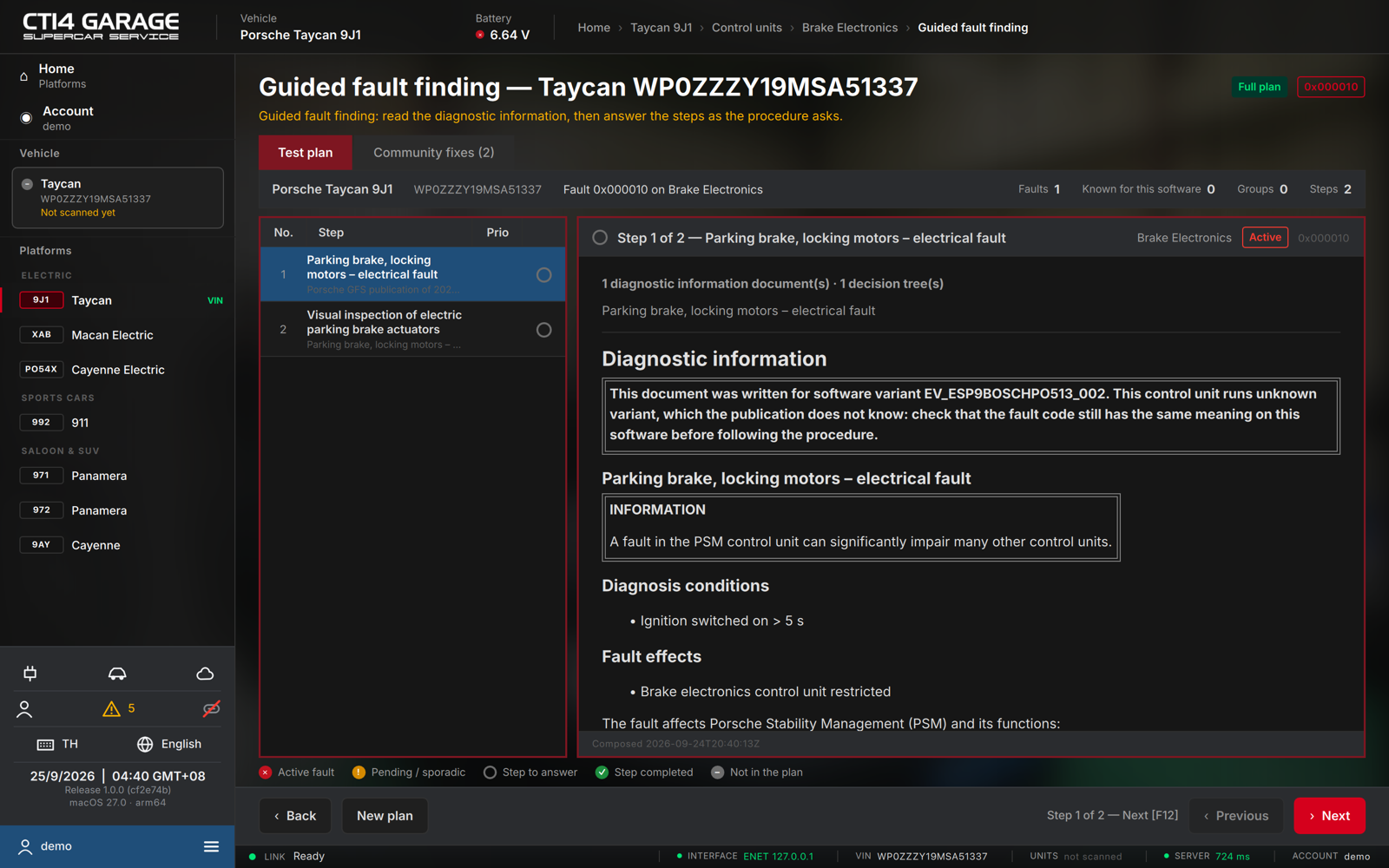
The header band shows the car, the VIN and the fault the plan is built for, with the counts: Faults, Known for this software, Groups and Steps.
- The rail on the left lists the steps with their Prio and a status pictogram. The first step opens with the plan summary.
- The step pane shows the diagnostic information for the step — the fault description, diagnosis conditions, fault effects, pictures, and what to check.
- Where a step needs something from the car or from you, it shows action buttons: read the relevant live values, clear the fault memory and read it again, jump to an actuator test or a maintenance procedure, or answer a question / enter a measured value. The recorded result appears under the step.
- Move with Next (F12) and Previous; Back (F11) returns to the fault memory. New plan composes the plan again from the latest scan.
Legend: ✕ active fault · ! pending / sporadic · ○ step to answer · ✓ step completed · – not in the plan. Faults that are known for the unit's software version are listed as Known for this software — usually a software update, not a repair, fixes them (check the integration test).
On the free tier the plan opens as a Preview: the steps and their ranking are visible, the checks and repair advice come with a car licence or the workshop plan.
Community fixes
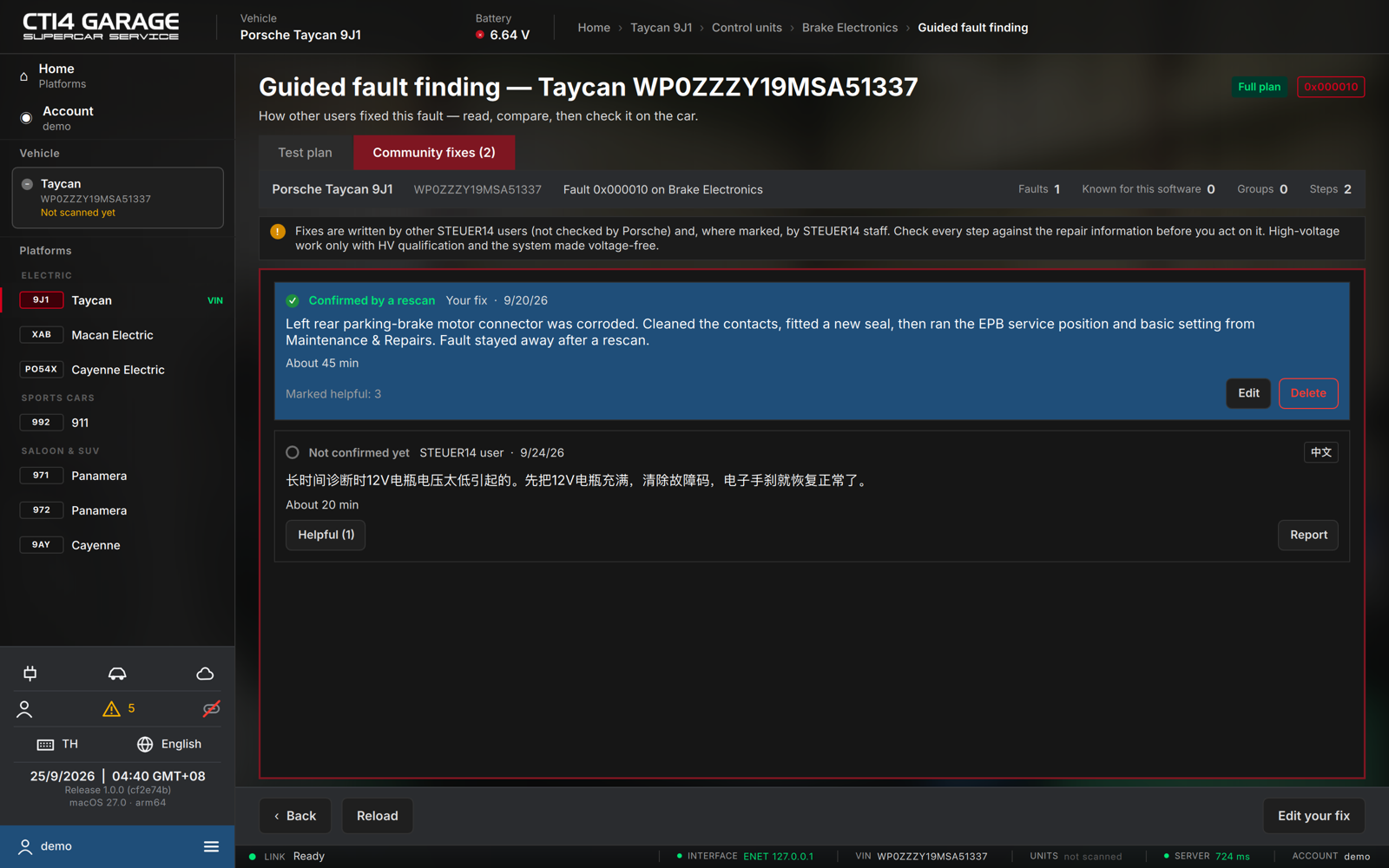
The Community fixes tab lists what other users did to fix this fault on the same platform.
- Confirmed by a rescan — the author's next scan of that car no longer showed the fault while the unit answered. Confirmed fixes are listed first.
- STEUER14 staff — written by the STEUER14 team, marked Checked by STEUER14.
- Each fix shows who wrote it (the workshop name, or STEUER14 user), the date, the language it was written in, the text, the parts replaced and roughly how long it took.
- Press Helpful on a fix that helped you; the count helps others choose. Press Report on a fix that is wrong, dangerous, advertising or contains personal data — reported fixes are reviewed and hidden when several users report them.
Fixes are written by other users and are not checked by Porsche. Check every step against the repair information before you act on it. High-voltage work only with HV qualification and the system made voltage-free.
Sharing your fix
With a car licence or the workshop plan you can share how you fixed a fault that was stored on one of your own scanned cars:
- On the fault's Community fixes tab press Share your fix.
- Describe what was wrong and what fixed it (at least 15 characters), add the part numbers you replaced and the time it took if you like, and press Share.
- Other users see your workshop name — never your VIN, e-mail or phone number; those are removed from the text automatically. When your next scan of that car no longer shows the fault, the fix is marked confirmed.
You can share one fix per fault; use Edit your fix to change it, or Delete on the fix. If support hides your fix, you still see it, marked Hidden — only you see it.