17. Diagnostic reports
A diagnostic report is a customer-facing PDF summarising the car's condition: it reads the stored faults and the report template's values from every present control unit, stores the report in your account and hands you the PDF.
Open it from the control-unit overview with Generate report (a scan must have run first).
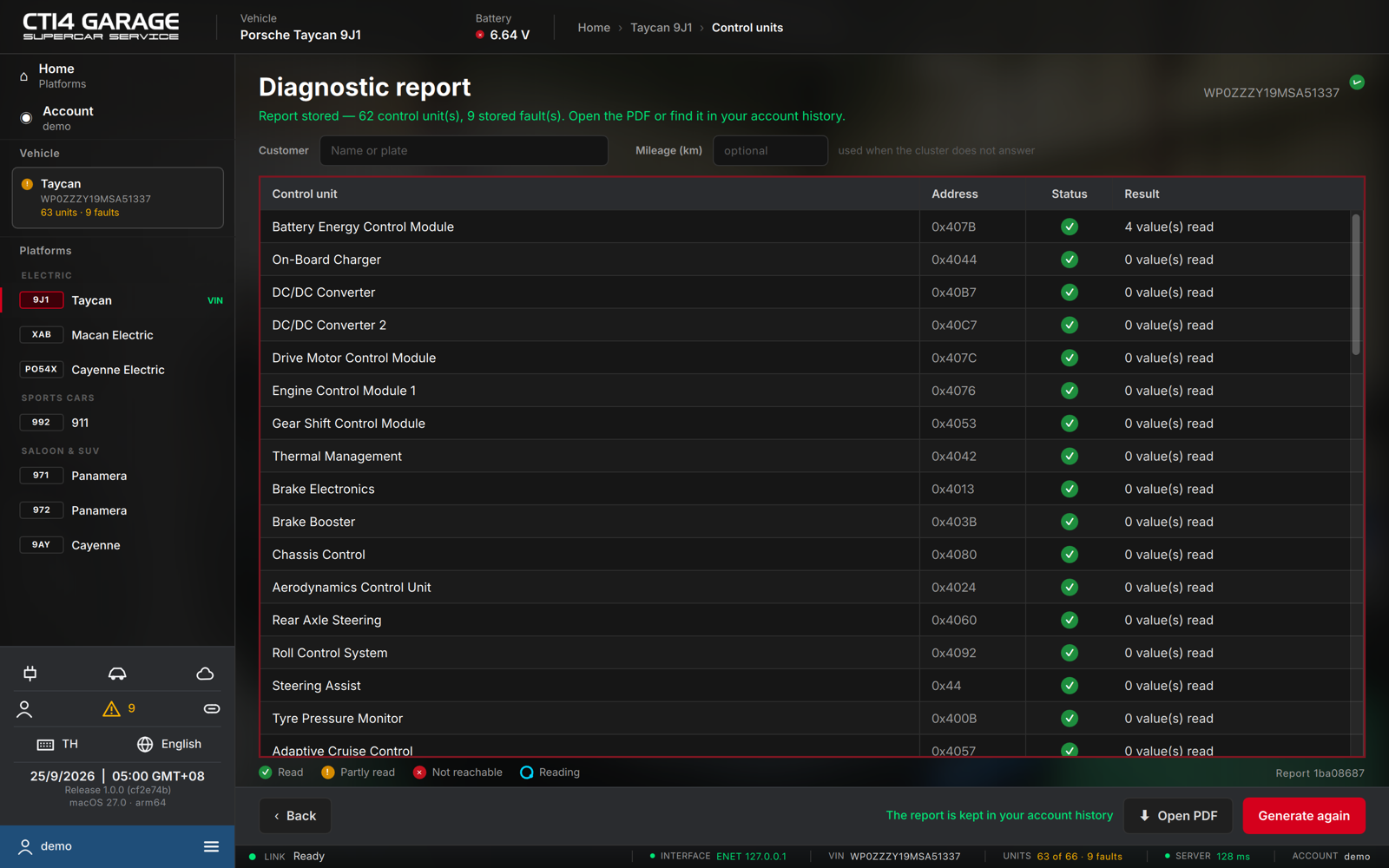
Generating a report
- On the workshop plan, fill in Customer (a name or plate) and, optionally, Mileage (km) — used when the instrument cluster does not report it. On other plans the report carries the account holder's name and these fields are not shown.
- Press Generate report. STEUER14 reads each present control unit in turn; the table shows the Control unit, its Address, a Status pictogram and the Result (N value(s) read). Cancel stops it.
- When it finishes, the verdict reads Report stored — N control unit(s), K stored fault(s). Open the PDF or find it in your account history.
- Press Open PDF to view or save it. Generate again rebuilds it.
Legend: ✓ read · ! partly read · ✕ not reachable · ○ reading.
Every report is kept in your account history and its PDF can be reopened later (see chapter 19 and chapter 20).
On the workshop plan, reports carry your own workshop name and logo (set them in the web panel's Settings); otherwise they carry the CT14 Garage mark.