12. Automatic coding & programming
Where manual coding (chapter 7) and manual programming leave every decision to you, the automatic functions reproduce what the factory tester does: they read the vehicle order and the control unit's identity, compare them with the target the factory rules require, and write only what deviates. Both live on a control unit's Coding & Programming tab.
Automatic coding
Codes a control unit to match the vehicle order. Open Coding & Programming → Automatic coding.
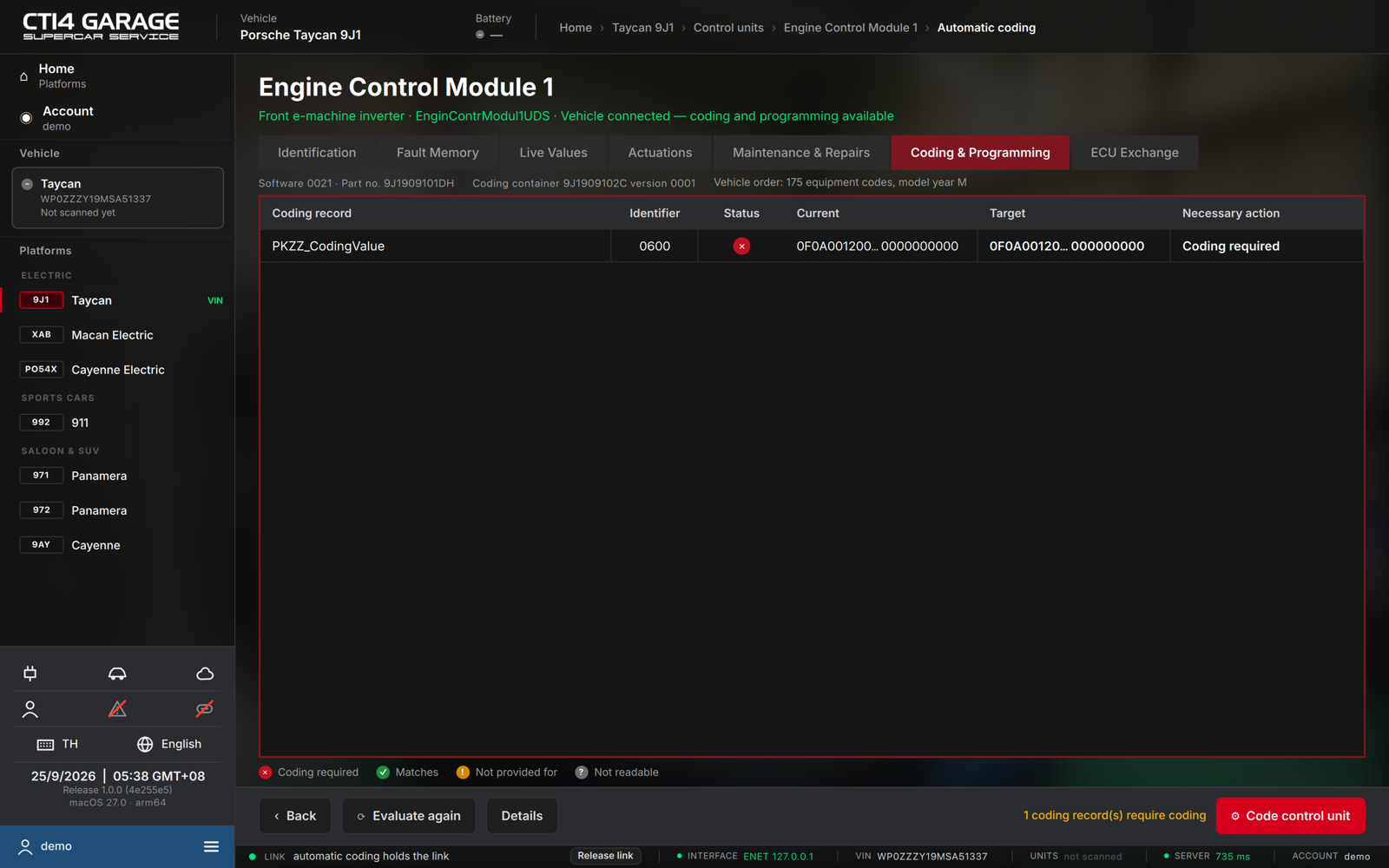
- On entry the panel reads the vehicle order and the control unit's identity and evaluates every coding record (press Evaluate again to re-run).
- The table lists each Coding record with its Identifier, a Status, the Current and Target values and the Necessary action. Select a record and press Details to see, field by field, which equipment (PR) code sets which bits.
- The verdict summarises the result — N coding record(s) require coding, or No system deviations were detected.
- Press Code control unit and confirm — a full backup of the control unit is taken first and every write is verified. Bits the rules do not define keep their current value.
Automatic coding needs a car licence or the workshop plan. Legend: ✕ coding required · ✓ matches · ! not provided for · ? not readable.
Automatic programming
Flashes a control unit to the software the build specification prescribes for the vehicle order. Open Coding & Programming → Automatic programming.
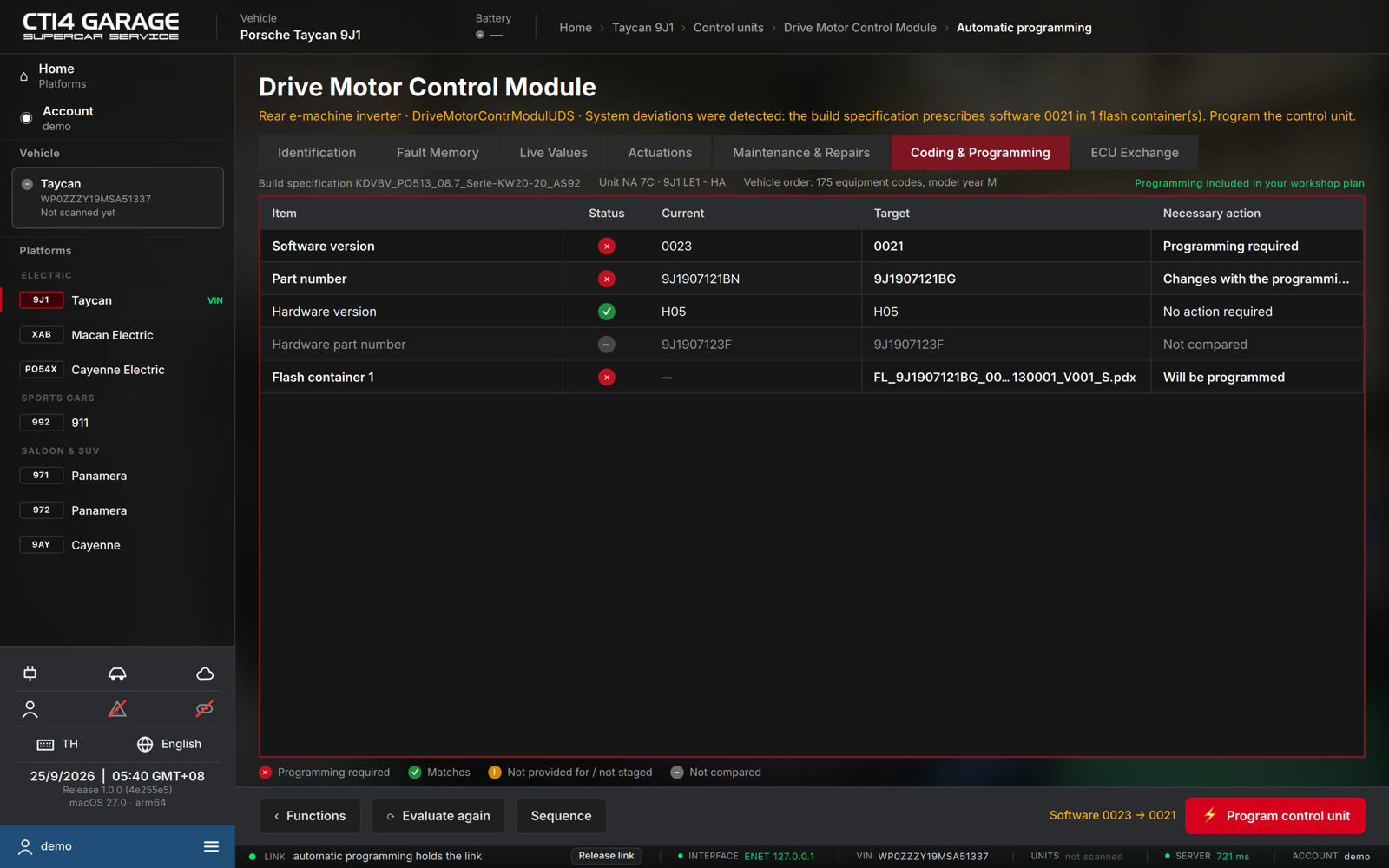
- On entry the panel reads the vehicle order and the unit's identification and compares the installed software with the build-specification target.
- The table shows Software version, Part number, Hardware version and the flash containers with Current vs Target and the Necessary action. The line above names the build specification and what covers the programming (Programming included in your workshop plan, or the programming pass).
- The verdict reads System deviations were detected: the build specification prescribes software X in N flash container(s), or No system deviations were detected.
- Press Program control unit. The confirmation shows the target software, the tester's pre-programming screens and three safety checks you must confirm:
- Battery charger connected (at least 90 A)
- Ignition on, all consumers off
- Drive off, vehicle secured
- Choose Program now. The view switches to the Sequence and runs the flash containers in order, then the tester's post-steps, with one progress bar for the whole job.
Who can program
Programming is included in the workshop plan. Otherwise it needs a programming pass for this car (€49, 7 days, every unit, container and retry): the panel shows Buy programming pass · €49 while the car is connected. The payment page opens in your browser and the panel continues as soon as the payment arrives (see chapter 2).
Do not interrupt programming. Losing power or the connection while a memory block is being written can leave the control unit unbootable. While programming runs, the app cannot be closed and the vehicle link cannot be released. Programming only starts when every flash container of the target is available on the server.
If a programming step fails, the protocol names the step and explains the control unit's answer in plain words, with what to do next.
Manual programming
Programming (manual) on the same tab flashes one software image you choose. It runs the same four-step wizard (Identification → Preconditions → Programming → Protocol); a search field finds the image by part number or software version. The same plan rules apply.