4. Fault memory
Fault memory holds the Diagnostic Trouble Codes (DTCs) a control unit has stored. STEUER14 reads them per control unit and for the whole car, decodes each code to plain text, shows its state and status byte, and can clear them. Reading and clearing fault memory is free on every control unit.
The whole car
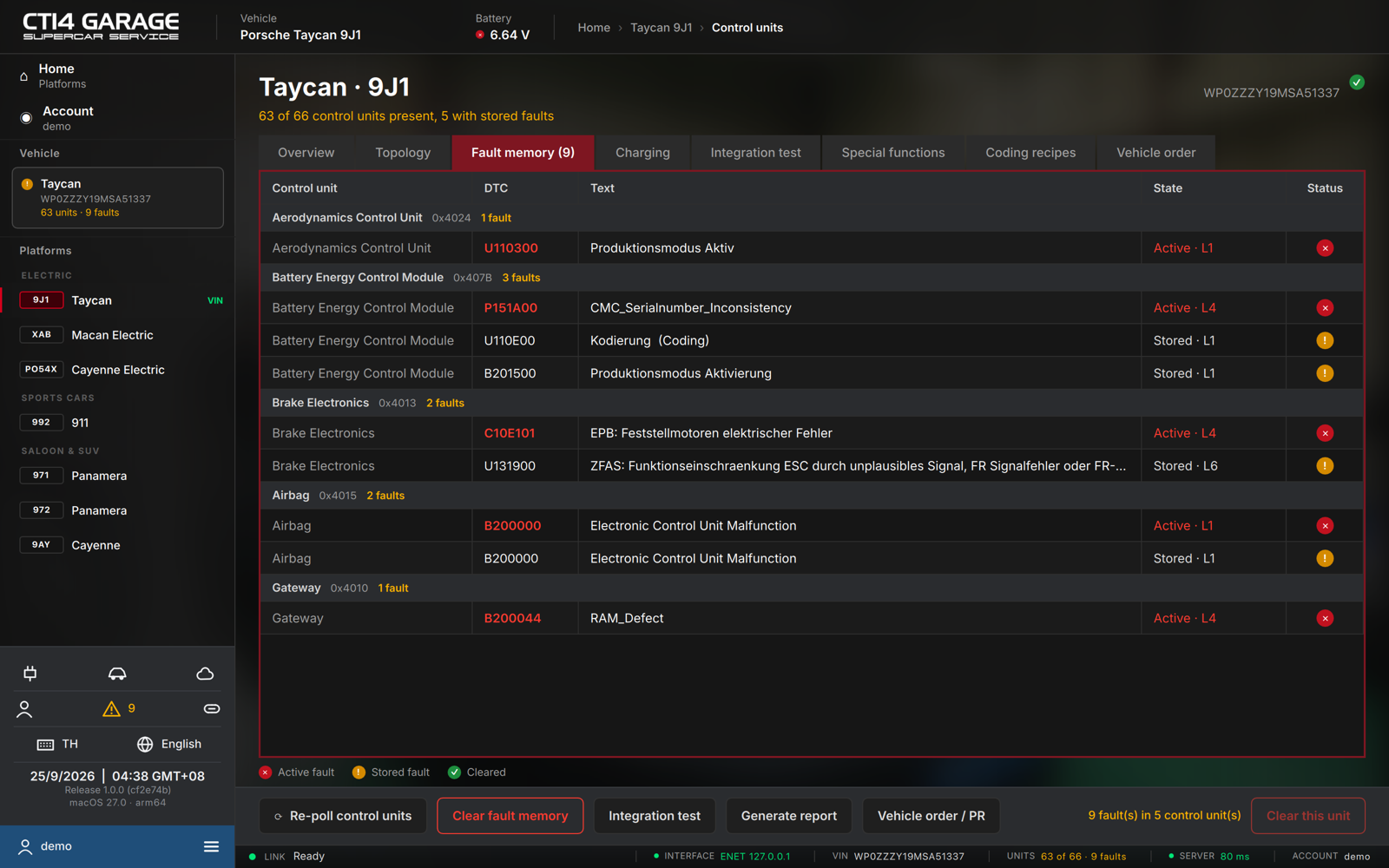
After a scan, the overview's Fault memory tab lists every stored fault grouped by control unit: DTC, Text, State and a Status pictogram. The function bar sums it up (N fault(s) in M control unit(s)); Clear this unit clears the selected unit only.
One control unit
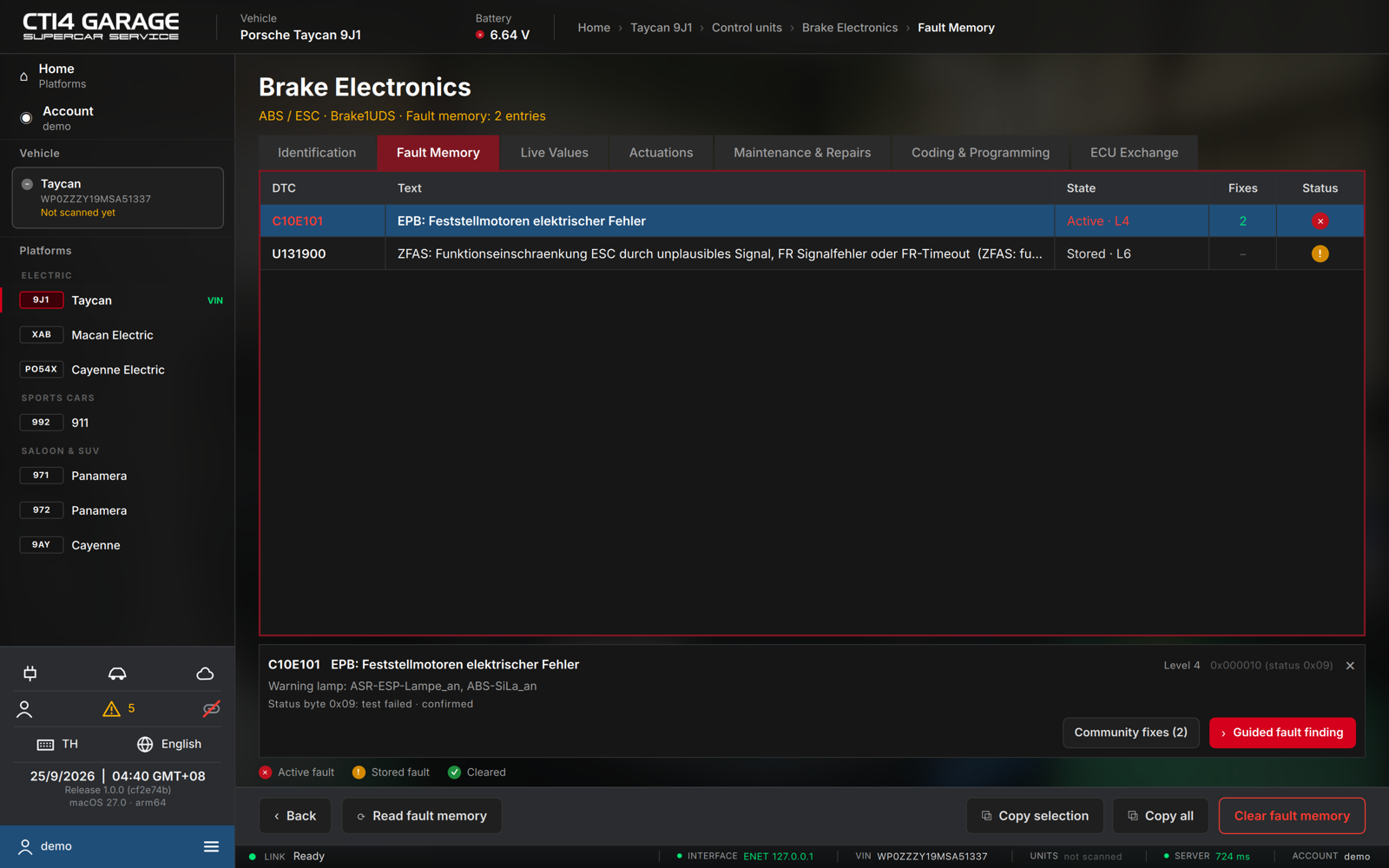
- From the overview, open a control unit and select the Fault Memory tab. The app reads the fault memory on entry and keeps it current; press Read fault memory to re-read at once.
- Each stored code is one row: DTC (the code), Text (the decoded fault), State (Active or Stored, plus MIL when it turns on the warning lamp, and the fault level, e.g. L4), Fixes (how many community fixes exist for this fault — green when one was confirmed by a rescan) and a Status pictogram.
- A fault that was not in the previous scan of this car is marked New.
- Click a row to open the detail strip below the table: the full text, the fault condition, the warning lamp, the decoded status byte (test failed / pending / confirmed / …) and — where the unit provides them — time, mileage, occurrence count and priority.
- From the detail strip:
- Freeze frame (N signals) opens the conditions the unit captured at the moment of the fault in their own window, with Copy for the whole list.
- Community fixes (N) shows how other users fixed this fault (see chapter 5).
- Guided fault finding builds a test plan for this fault (see chapter 5).
- Copy selection / Copy all put the faults on the clipboard as text, for a message or a job card.
Status pictograms (see the legend under the table):
| Pictogram | Meaning |
|---|---|
| ✕ (red) | Active fault — failed in the current operating cycle |
| ! (amber) | Stored fault — recorded but not currently active |
| ✓ (green) | Cleared — erased in this session |
Language. In Chinese, fault texts show the Chinese translation first with the original text in brackets. Texts without a translation yet appear in the original (often German).
Clearing fault memory
Clearing permanently erases the stored codes. Fix the underlying fault first; a code for a real defect returns on the next drive cycle.
One control unit
- On the unit's Fault Memory tab, press Clear fault memory (shown when the unit has stored codes).
- Confirm the dialog. The rows turn green and the verdict reads Fault memory cleared.
The whole car
- Run Connect & poll so the vehicle-wide fault list is complete.
- Press Clear fault memory on the overview function bar and confirm. The app clears each unit in turn and reports Cleared / Clear failed per unit, then reads the fault memory again.